8. 외부 설정 파일 - application.properties
- 애플리케이션 속성의 기본 값을 바꿀 수 있는 설정 파일.
- 16개의 분류. 약 1700개의 속성을 제공
* 부트 자동화
1) 스타터 - 의존 라이브러리 자동 관리
2) 자동 설정 - 자동 빈 등록
3) 외부 설정 파일 - 기본 설정 변경
[src/main/resources/application.properties]
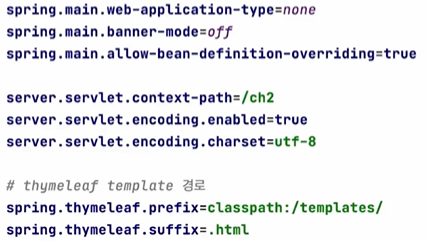
key = value 쌍으로 되어있다.
여러 가지 속성들이 존재하는데 이 속성 값을 바꿔주는 것이다.
https://docs.spring.io/spring-boot/docs/current/reference/html/application-properties.html
Common Application Properties
docs.spring.io
[Main.java]
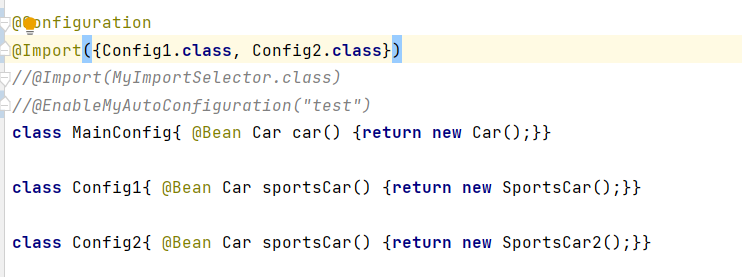
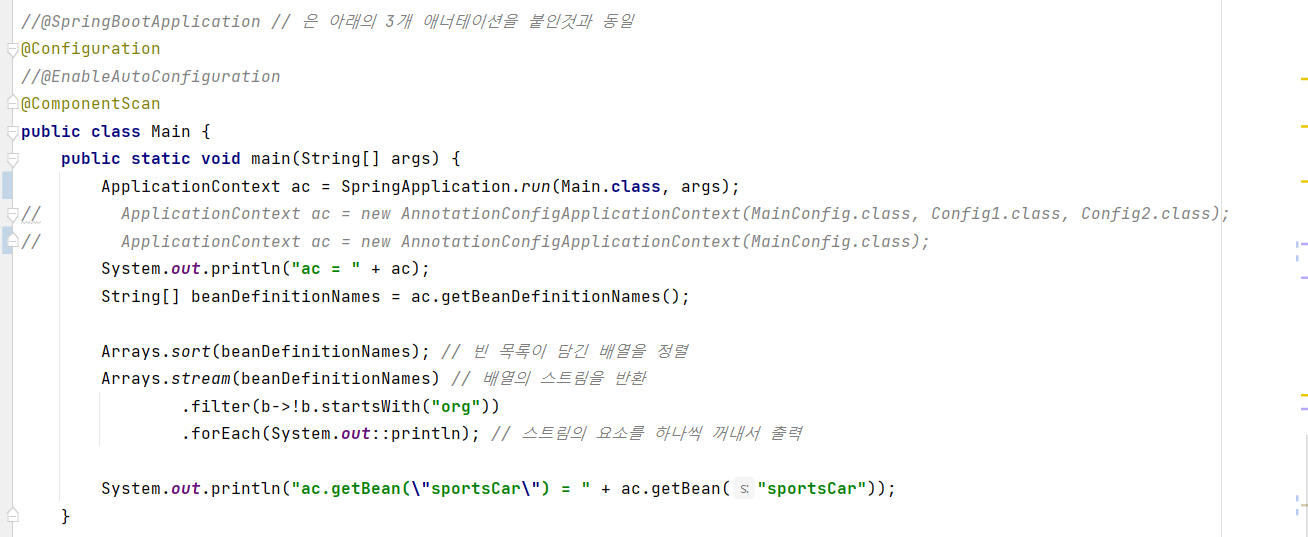
Config1, Config2 설정 파일을 둘 다 등록해서 현재 이름이 똑같은 sportsCar 빈을 충돌나게 한다.
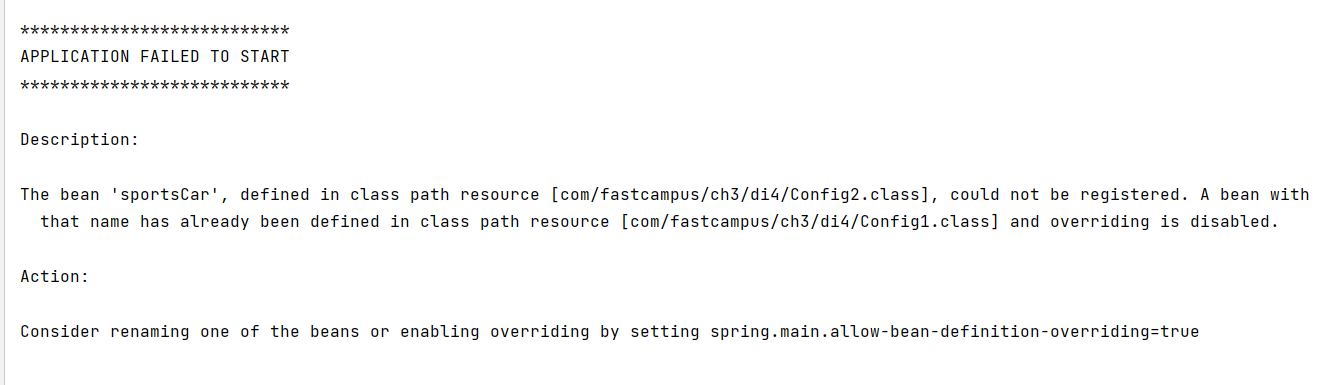
빈이 Config1에서 이미 등록이 됐는데 Config2에서 등록하려고 하기 때문에 충돌이 났다.
그래서 빈의 이름을 바꾸거나 아니면 셋팅을 바꿀 것을 권장하고 있다.
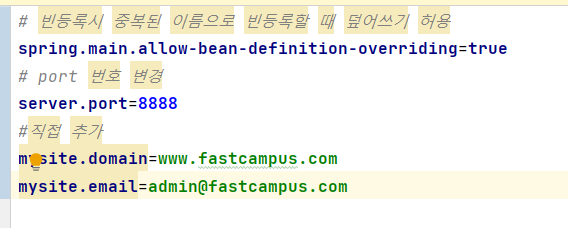
spring.main.allow-bean-definition-overriding=true의 기본은 false인데 이 속성을 application.properties에 true로
입력한 후 실행해보자.
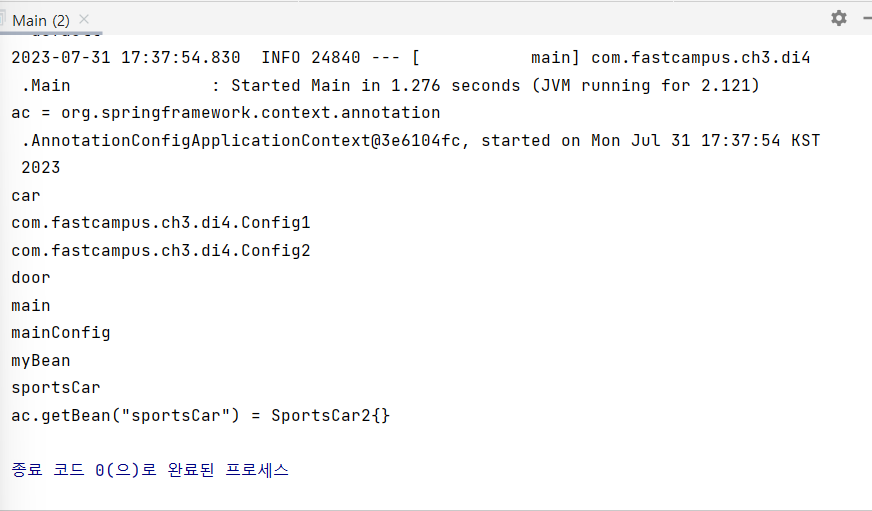
빈에서 충돌이 생겨도 오버라이딩이 가능하도록 설정을 true로 주었기 때문에 실행하면 문제없이 동작한다.
9. 사용자 정의 속성 추가히기 - @ConfigurationProperties
- 포트 번호를 변경하거나 직접 추가해주는 것도 가능하다.
[application.properties]
[MyProperties.java]
[Main.java]

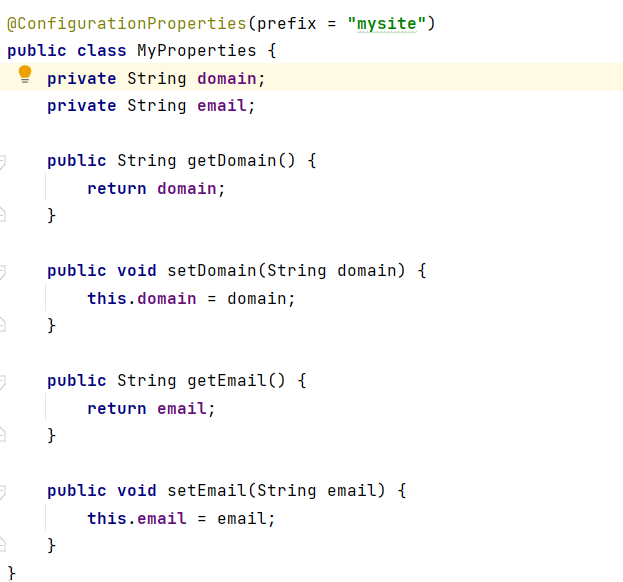
지정한 클래스가 ConfiguratoinProperties라는 걸 적어주면 MyProperties가 빈으로 등록이 되고,
그 빈을 통해 정보를 getter를 호출해서 그 값을 읽을 수 있게 된다.
- ac.getBean(MyProperties.class) 대신 빈을 주입받을 수도 있다.
주입받아서 사용하려면 CommandLineRunner를 구현하여 사용할 수 있다.
run 메소드를 구현할 수 있는데 이는 인스턴스 메소드를 하나 만드는 것이다.
이전에는 getBean(MyProperties.class)를 통해 수동으로 빈을 주입했다면, 이건 자동으로 주입을 하는 것이다.
main메소드랑 똑같은데 main은 static 메소드, run은 인스턴스 메소드일 뿐이다!
실행은 main이 하지만, 수행은 run 메소드에서 수행되도록 하는 것이다.
[Main.java]
@EnableConfigurationProperties({MyProperties.class})  // 클래스 지정
//@SpringBootApplication // 은 아래의 3개 애너테이션을 붙인것과 동일
@Configuration
//@EnableAutoConfiguration
@ComponentScan
public class Main implements CommandLineRunner {
    @Autowired
    MyProperties prop; // 인스턴스 변수

    @Autowired
    ApplicationContext ac;

    @Override
    public void run(String... args) throws Exception {
        System.out.println("prop.getEmail() = " + prop.getEmail());
        System.out.println("prop.getDomain() = " + prop.getDomain());

        System.out.println("ac = " + ac);
        String[] beanDefinitionNames = ac.getBeanDefinitionNames();

        Arrays.sort(beanDefinitionNames); // 빈 목록이 담긴 배열을 정렬
        Arrays.stream(beanDefinitionNames) // 배열의 스트림을 반환
                .filter(b->!b.startsWith("org"))
                .forEach(System.out::println); // 스트림의 요소를 하나씩 꺼내서 출력
    }

    public static void main(String[] args) {
        ApplicationContext ac = SpringApplication.run(Main.class, args);
//        ApplicationContext ac = new AnnotationConfigApplicationContext(MainConfig.class, Config1.class, Config2.class);
//        ApplicationContext ac = new AnnotationConfigApplicationContext(MainConfig.class);

//        System.out.println("ac.getBean(\"sportsCar\") = " + ac.getBean("sportsCar"));
//        MyProperties prop = ac.getBean(MyProperties.class);
//        System.out.println("prop.getDomain() = " + prop.getDomain());
//        System.out.println("prop.getEmail() = " + prop.getEmail());
    }
'SpringBoot' 카테고리의 다른 글
| ch3 11. 데이터 모델링이란 (0) | 2023.07.31 |
|---|---|
| ch3 10. AOP 원리와 용어 (0) | 2023.07.31 |
| ch3 08. @Import와 @Conditional (0) | 2023.07.31 |
| ch3 07. 의존성 관리와 설정의 자동화(2) (0) | 2023.07.31 |
| ch3 06. 의존성 관리와 설정의 자동화(1) (0) | 2023.07.31 |


