<YoilTeller 실습>
package com.fastcampus.ch2;

import org.springframework.web.bind.annotation.RequestMapping;
import org.springframework.web.bind.annotation.RestController;

import javax.servlet.http.HttpServletRequest;
import javax.servlet.http.HttpServletResponse;
import java.io.IOException;
import java.io.PrintWriter;
import java.util.Calendar;

// 년월일을 입력하면 요일을 알려주는 원격 프로그램
@RestController
public class YoilTeller {
    @RequestMapping("/getYoil")
    public void main(HttpServletRequest request, HttpServletResponse response) throws IOException {
        // 1. 입력
        String year = request.getParameter("year");
        String month = request.getParameter("month");
        String day = request.getParameter("day");

        int yyyy = Integer.parseInt(year);
        int mm = Integer.parseInt(month);
        int dd = Integer.parseInt(day);

        // 2. 작업 - 요일을 계산
        Calendar cal = Calendar.getInstance(); // 현재 날짜와 시간을 갖는 cal
        cal.clear(); // cal의 모든 필드를 초기화(정확한 계산을 위해)
        cal.set(yyyy, mm-1, dd); // 월(mm)은 0부터 11이기 때문에 1을 빼줘야 함.

        int dayOfWeek = cal.get(Calendar.DAY_OF_WEEK); // 1-7을 반환. 1 : 일요일, 2 : 월요일
        char yoil = "일월화수목금토".charAt(dayOfWeek-1); // 배열은 0부터 시작하니 1을 빼줌. 1~7 -> 0~6

        // 3. 출력 - 작업 결과를 브라우저에 전송
        response.setCharacterEncoding("ms949"); // 한글 윈도우 MS 949

        PrintWriter out = response.getWriter();
        out.println("<html>");
        out.println("<head>");
        out.println("</head>");
        out.println("<body>");
        out.println("year = " + year);
        out.println("month = " + month);
        out.println("day = " + day);
        out.println("yoil = " + yoil);
        out.println("</body>");
        out.println("</html>");

    }
}
예제는 현재 관심사가 3부분으로 나누어져 있다.
하나의 메소드가 여러 일을 처리하고 있는 것(입력, 처리, 출력)
이 Main 메소드가 하나의 작업만 수행하도록 분리한다.
1. 이름이 일치하도록 매개변수에 작성
IF) URL에 http://localhost:8080/getYoil?year=2023&month=6&day=1입력을 주면 다음과 같이 저장된다.
| Key | Value |
| "year" | ["2023"] |
| "month" | ["6"] |
| "day" | ["1"] |
Spring이 해당 맵을 참고로 해서 year, month, day값을 넣어주게 된다.
(cf. Spring이 어떻게 판단할까? Reflection API 이용해서 메소드의 매개변수가 몇개가 있고 이름이 뭔지 알아낸 다음
이름하고 일치하는 부분을 읽어서 값을 넣어주게 된다.)
@RestController
public class YoilTeller {
    @RequestMapping("/getYoil")
	public void main(String year, String month, String day, HttpServletResponse response) throws IOException {
        // 1. 입력
//        String year = request.getParameter("year");
//        String month = request.getParameter("month");
//        String day = request.getParameter("day");
입력 부분을 다음과 같이 수정한 브라우저를 돌려보면 다음과 같은 결과를 얻을 수 있다.
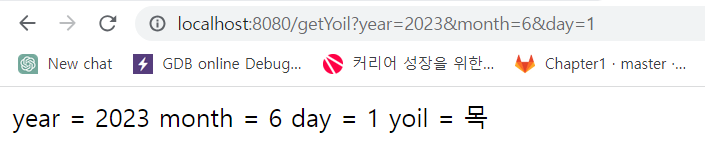
전에는 request 객체로부터 getParameter()를 호출해서 값을 가져왔는데, 매개변수 선언으로 바로 가져온 것을
확인할 수 있다.
2. 변환하는 코드 부분 수정
year, month, day는 문자열이고, 날짜를 계산하기 위해선 숫자로 변환해줘야 한다.
Spring은 이것도 자동 변환을 수행해준다.
다음과 같이 String을 int로 수정한다. (cal.set(year, month -1, day);로 수정 후 실
@RestController
public class YoilTeller {
    @RequestMapping("/getYoil")
    public void main(int year, int month, int day, HttpServletResponse response) throws IOException {
        // 1. 입력
//        String year = request.getParameter("year");
//        String month = request.getParameter("month");
//        String day = request.getParameter("day");

//        int yyyy = Integer.parseInt(year);
//        int mm = Integer.parseInt(month);
//        int dd = Integer.parseInt(day);
첫 번째 관심사가 코드에서 사라진 것을 확인할 수 있다.
수정 후에도 이전과 똑같이 작동해야 성공!
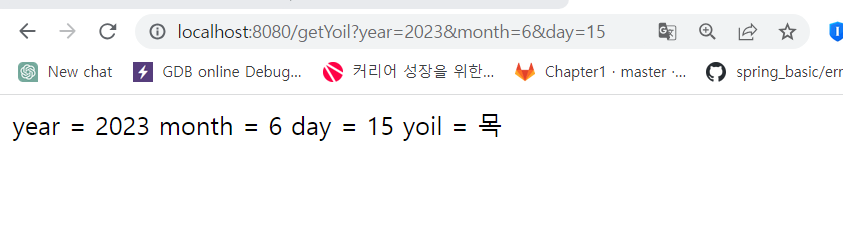
이제 자주 변하는 부분과 변하지 않는 부분 두 개의 관심사가 남았다.
        // 2. 작업 - 요일을 계산
        Calendar cal = Calendar.getInstance(); // 현재 날짜와 시간을 갖는 cal
        cal.clear(); // cal의 모든 필드를 초기화(정확한 계산을 위해)
        cal.set(year, month-1, day); // 월(mm)은 0부터 11이기 때문에 1을 빼줘야 함.

        int dayOfWeek = cal.get(Calendar.DAY_OF_WEEK); // 1-7을 반환. 1 : 일요일, 2 : 월요일
        char yoil = "일월화수목금토".charAt(dayOfWeek-1); // 배열은 0부터 시작하니 1을 빼줌. 1~7 -> 0~6
처리 부분 - 작업 잘 변하지 않는 부분
        // 3. 출력 - 작업 결과를 브라우저에 전송
        response.setCharacterEncoding("ms949"); // 한글 윈도우 MS 949

        PrintWriter out = response.getWriter();
        out.println("<html>");
        out.println("<head>");
        out.println("</head>");
        out.println("<body>");
        out.println("year = " + year);
        out.println("month = " + month);
        out.println("day = " + day);
        out.println("yoil = " + yoil);
        out.println("</body>");
        out.println("</html>");
출력하는 부분 - html이고 디자인이 많이 들어가는 부분이기 때문에 자주 변하는 부분
-> 이 부분을 분리하고자 한다.(MVC 패턴의 View에 해당하는 부분)
3. resources/templates 경로에 yoil.html 파일을 생성해준다.
<thymeleaf 템플릿 사용>
<html lang="en" xmlns:th="http://www.thymeleaf.org">
<body>
<h1 th:text="|${year}년 ${month}월 ${day}일은 ${yoil}입니다.|">2020년 1월 1일은 수요일</h1>
</body>
하나의 텍스트에 여러 개의 값을 출력할 때는 ||로 묶어줘야 한다.
브라우저로 봤을 때 이렇게 코딩해놓으면 실제로 어떤 값들이 들어갔는지 보기 편하고,
빈 값들이 채워질 때는 해당 내용이 적어놓은 하드코딩 되어있는걸 대체하기 때문에 JSP에 비해서 View를 작성하는 것이
편리하다.
그래서 Spring Boot는 thymeleaf라는 템플릿 엔진을 기본으로 사용하고 있다.
<yoil.html>
<!DOCTYPE html>
<html lang="en" xmlns:th="http://www.thymeleaf.org">
<head>
    <meta charset="UTF-8">
    <title>YoilTeller</title>
</head>
<body>
<h1 th:text="|${year}년 ${month}월 ${day}일은 ${yoil}입니다.|">2020년 1월 1일은 수요일</h1>
</body>
</html>
4. Model 생성
그러면 이 thymeleaf에 year, month, day와 같은 값을 전달해야 하는데 이 때 사용해야 하는 것이 Model이다.
Model은 단순히 맵 형태로 값을 담아서 전달해주는 역할을 한다. (DispatcherServlet이 작업을 수행)
->
YoilTeller 클래스에 Model 객체 선언 후 작업한 결과를 저장해주는 코드를 작성해준다.
뷰의 이름은 반환 타입이 String이니 main메소드의 반환 타입을 void -> String으로 변경해준다.
package com.fastcampus.ch2;

import org.springframework.stereotype.Controller;
import org.springframework.ui.Model;
import org.springframework.web.bind.annotation.RequestMapping;
import org.springframework.web.bind.annotation.RestController;

import javax.servlet.http.HttpServletRequest;
import javax.servlet.http.HttpServletResponse;
import java.io.IOException;
import java.io.PrintWriter;
import java.util.Calendar;

// 년월일을 입력하면 요일을 알려주는 원격 프로그램
@Controller
public class YoilTeller {
    @RequestMapping("/getYoil")
    public String main(int year, int month, int day, Model model) throws IOException {

        // 2. 작업 - 요일을 계산
        Calendar cal = Calendar.getInstance(); // 현재 날짜와 시간을 갖는 cal
        cal.clear(); // cal의 모든 필드를 초기화(정확한 계산을 위해)
        cal.set(year, month-1, day); // 월(mm)은 0부터 11이기 때문에 1을 빼줘야 함.

        int dayOfWeek = cal.get(Calendar.DAY_OF_WEEK); // 1-7을 반환. 1 : 일요일, 2 : 월요일
        char yoil = "일월화수목금토".charAt(dayOfWeek-1); // 배열은 0부터 시작하니 1을 빼줌. 1~7 -> 0~6

        // 작업한 결과를 Model에 저장(DispatcherServlet이 Model을 View로 전달)
        model.addAttribute("year", year);
        model.addAttribute("month", month);
        model.addAttribute("day", day);
        model.addAttribute("yoil", yoil);

        return "yoil"; // yoil.html - 뷰의 이름을 반환


    }
}
Cf. return문을 출력하는 부분에서 뷰가 아닌 문자열만 출력되는 상황이 있었는데
@RestController -> @Controller로 변경해주니 해결됐다!
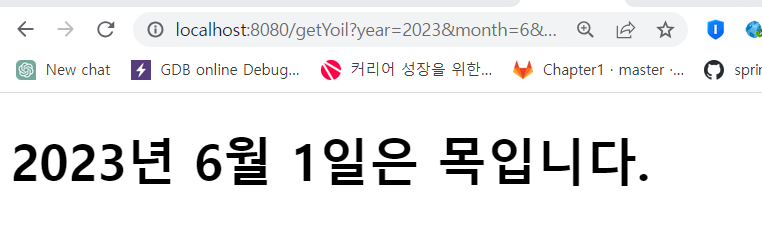
정상적으로 실행된다면 이와 같은 결과를 얻을 수 있다.
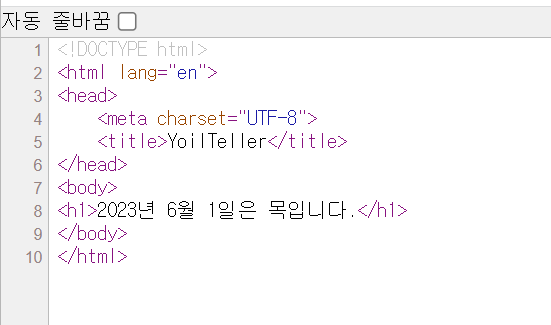
yoil.html 뷰가 제대로 반영된 것을 확인할 수 있다.
<YoilTeller의 URL을 /yoil로 변경>
- 반환 타입을 void로 지정하고, return 문을 삭제해준다.
package com.fastcampus.ch2;

import org.springframework.stereotype.Controller;
import org.springframework.ui.Model;
import org.springframework.web.bind.annotation.RequestMapping;
import org.springframework.web.bind.annotation.RestController;

import javax.servlet.http.HttpServletRequest;
import javax.servlet.http.HttpServletResponse;
import java.io.IOException;
import java.io.PrintWriter;
import java.util.Calendar;

// 년월일을 입력하면 요일을 알려주는 원격 프로그램
@Controller
public class YoilTeller {
    @RequestMapping("/yoil")
    public void main(int year, int month, int day, Model model) throws IOException {

        // 2. 작업 - 요일을 계산
        Calendar cal = Calendar.getInstance(); // 현재 날짜와 시간을 갖는 cal
        cal.clear(); // cal의 모든 필드를 초기화(정확한 계산을 위해)
        cal.set(year, month-1, day); // 월(mm)은 0부터 11이기 때문에 1을 빼줘야 함.

        int dayOfWeek = cal.get(Calendar.DAY_OF_WEEK); // 1-7을 반환. 1 : 일요일, 2 : 월요일
        char yoil = "일월화수목금토".charAt(dayOfWeek-1); // 배열은 0부터 시작하니 1을 빼줌. 1~7 -> 0~6

        // 작업한 결과를 Model에 저장(DispatcherServlet이 Model을 View로 전달)
        model.addAttribute("year", year);
        model.addAttribute("month", month);
        model.addAttribute("day", day);
        model.addAttribute("yoil", yoil);

    }
}
작업 결과를 보여줄 뷰를 알려주지 않으면, 요청 URL을 가지고 뷰의 이름으로 사용한다.
이렇게 하면 뷰의 이름과 URL이 일치해서 관리하기 편한 장점이 있지만, 메소드 내에서 경우에 따라 다른 뷰를 보여줘야
하는 상황이 발생할 수 있다.(ex. 에러가 발생했을 경우 error.html 반환) --> '유연성이 떨어진다는 단점' 가능은 하다!
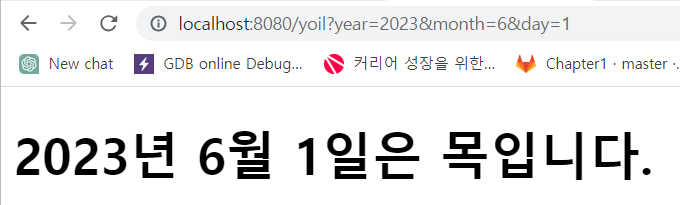
정상적으로 실행되면 다음과 같은 결과를 얻을 수 있다.
<ModelAndView를 이용해서 변경>
- 반환 타입을 ModelAndView로 변경(Model과 View를 묶어서 DispatcherServlet에 보내준다.)
-> Model를 메소드 내에서 생성
package com.fastcampus.ch2;

import org.springframework.stereotype.Controller;
import org.springframework.ui.Model;
import org.springframework.web.bind.annotation.RequestMapping;
import org.springframework.web.bind.annotation.RestController;
import org.springframework.web.servlet.ModelAndView;

import javax.servlet.http.HttpServletRequest;
import javax.servlet.http.HttpServletResponse;
import java.io.IOException;
import java.io.PrintWriter;
import java.util.Calendar;

// 년월일을 입력하면 요일을 알려주는 원격 프로그램
@Controller
public class YoilTeller {
    @RequestMapping("/yoil")
    public ModelAndView main(int year, int month, int day) throws IOException {
        ModelAndView mv = new ModelAndView();
        mv.setViewName("yoilError");

        if(!isValue(year, month, day)) {
            return mv;
        }

        // 2. 작업 - 요일을 계산
        Calendar cal = Calendar.getInstance(); // 현재 날짜와 시간을 갖는 cal
        cal.clear(); // cal의 모든 필드를 초기화(정확한 계산을 위해)
        cal.set(year, month-1, day); // 월(mm)은 0부터 11이기 때문에 1을 빼줘야 함.

        int dayOfWeek = cal.get(Calendar.DAY_OF_WEEK); // 1-7을 반환. 1 : 일요일, 2 : 월요일
        char yoil = "일월화수목금토".charAt(dayOfWeek-1); // 배열은 0부터 시작하니 1을 빼줌. 1~7 -> 0~6

        // 작업한 결과를 Model에 저장(DispatcherServlet이 Model을 View로 전달)
        mv.addObject("year", year);
        mv.addObject("month", month);
        mv.addObject("day", day);
        mv.addObject("yoil", yoil);
        mv.setViewName("yoil");

        return mv;

    }

    private boolean isValue(int year, int month, int day) {
        return true;
    }
}
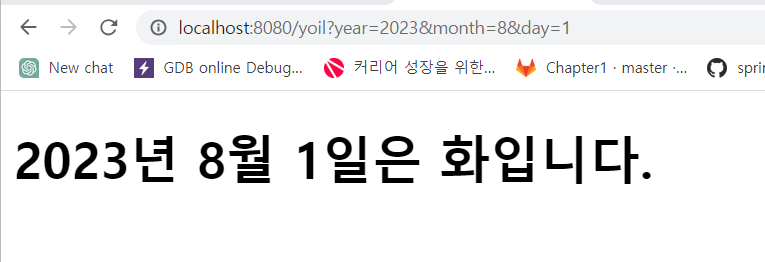
해당 메소드는 ModelAndView를 반환한다. (ModelAndView에는 데이터와 뷰 이름이 존재)
기본 값으로는 yoilError를 설정하고, 사용자가 날짜를 잘못 입력했다면 바로 리턴한다. (yoilError가 뷰)
제대로 들어왔다면 작업을 수행하고 작업 결과를 보여줄 뷰를 yoil.html로 지정해주고, ModelAndView를 반환한다.
Model을 DispatcherServlet이 만드는지와 메소드 내에서 직접 만들어주는지에 대한 차이가 존재.
이걸 사용하는 상황은 예외처리를 할 때다. Exception Handler로 예외를 처리할 때 매개변수로 Model을 쓸 수
없어서 메소드 내에서 모델을 만들어서 사용하면 된다.
그 외에는 매개변수로 받아오는 경우 사용.
'SpringBoot' 카테고리의 다른 글
| ch2 08. @RequestParam과 @ModelAttribute - 이론 (0) | 2023.07.07 |
|---|---|
| ch2 08. @RequestParam과 @ModelAttribute - 실습 (0) | 2023.07.07 |
| ch2 06. MVC로 관심사를 분리하기 (1) - 실습 (0) | 2023.07.04 |
| ch2 05. 원격 프로그램으로 응답하기 (0) | 2023.07.04 |
| ch2 04. HTTP 요청과 응답 (0) | 2023.07.04 |


