1. 타임리프(thymeleaf)란?
- 자바 웹개발에 이상적인 '모던 서버 사이드 자바 템플릿 엔진'
*.html로 타임리프 템플릿을 작성 -> 템플릿 엔진이 html 템플릿을 해석해서 html로 만들어서 보여준다.
여러 종류가 있지만 Spring boot에서는 thymeleaf가 기본으로 사용된다. (JSP보다 장점이 더 많다)
- HTML과 유사해서 디자이너와 개발자간의 협업을 쉽게 해준다.
- 확장성이 뛰어나며, 커스터마이징이 쉽다.
- 다양한 도구와 확장 프로그램으로 구성된 에코 시스템 제공
http://www.thymeleaf.org/ecosystem.html
Ecosystem - Thymeleaf
Bootify.io https://bootify.io/ Bootify.io is a code generator for Spring Boot. Three options can be selected for the frontend - all based on Thymeleaf, together with an optional Webpack, Bootstrap or Tailwind CSS. The user gets a customized Spring Boot app
www.thymeleaf.org
2. 타임리프 템플릿
- 타임리프 템플릿(*.html)은 HTML과 유사해서 편집 후 내용 확인이 쉽다.
- th:* 속성은 타임리프 전용 속성이며, 브라우저는 이를 무시한다. (브라우저가 이해할 수 없기 때문에!)
<table>
	<thead>
    	<tr>
        	<th th:text="#{msgs.headers.name}">Name</th>
        	<th th:text="#{msgs.headers.price}">Price</th>
        </tr>
    </thead>
    <tbody>
    	<tr th:each="prod: ${allProducts}">
        	<td th:text="{prod.name}">Oranges</td>
        	<td th:text="{#numbers.formatDecimal(prod.price, 1, 2)}">0.99</td>
       	</tr>
     </tbody>
 </table>
브라우저로 보면 이렇게 보인다. 아직 템플릿 엔진에 의해 처리되지 않았기 때문이다.
처리되면 "#{msgs.headers.name}" 과 같은 부분들이 처리돼서 해당 값들이 Name과 같은 내용을 대체한다.
th:each는 반복문이며, #numbers는 유틸객체이다.
이런 다양한 유틸객체들을 사용할 수 있기 때문에 숫자를 원하는 형식에 맞게 표현할 수 있도록 '형식화'를 해준다.
<th>${msgs.headers.name}</th>
<th>${msgs.headers.price}</th>
JSP 같은 경우에는 이런식으로 태그 사이에 처리될 부분을 적는데, 이것보다는 타임리프처럼 속성으로 처리하는게
더 html과 유사하게 된다.
3. th:text와 th:utext
- th:text는 ${...}을 해석해서 태그의 텍스트 노드로
<span th:text="${lastName}">Jyeon</span>
<span>[[${lastName}]]</span>
Spring에 컨트롤러가 작업한 결과를 담아서 보내주면, 그 결과를 text의 형태로 보여줄 때 text속성을 사용한다.
* 출력하고자 하는 text를 $를 붙이고 걸어주면 JYeon 텍스트는 없애고 ${lastName}이 대체하게 된다.
아니면, JSP처럼 직접 넣어줘도 되는데 이 경우 앞뒤로 [[ ]]를 넣어줘야 한다.
- 문자열 ('...') 결합(+)과 리터럴 치환(|...|)
<span th:text="'My name is' + ${lastName} + ',' + ${firstName}"></span>
<span th:text="|My name is ${lastName}, ${firstName}|"></span>
출력해야하는 텍스트가 여러 개일 땐 문자열 결합이 필요하다.
* 1번째가 복잡하다면 | | 를 사용해줄 수 있다. -> '리터럴 치환'
- th:utext는 태그의 <,>를 < >로 바꾸지 않고 그대로
<span th:text="${'<i>JYeon, C</i>'}">JYeon, C</span>
<span th:utext="${'<i>JYeon, C</i>'}">JYeon, C</span>
위 코드의 실행 결과
<span>< i> JYeon, C< /i></span>
<span><i>JYeon, C</i></span>text속성은 내용을 그대로 보여주긴 하는데, 내용을 text로 해석해서 보여준다.
<i>는 태그인데 태그로 해석되지 않고 있는 그대로인 텍스트로 < > 를 <, >로 보여주게 된다.
utext속성은 태그를 html 엔티티로 바꾸는 것을 하지 않는다.
그래서 해당 내용이 그대로 들어가게 된다. 브라우저에 의해 태그로 간주 가능.
<실습>
- HomeController에서 test 메소드 생성
@Controller
public class HomeController { // 원격 프로그램
    // 2. URL과 메소드를 연결
    @RequestMapping("/")
    public String main() {
        return "index"; // templates/index.html
    }

    @GetMapping("/test")
    public String test(Model model) {
        model.addAttribute("lastName", "Jyeon");
        model.addAttribute("firstName", "C");
        return "test"; // templates/test.html
    }
}
- test.html 파일 생성
<html lang="en" xmlns:th="http://www.thymeleaf.org">이 속성이 있어야 타임리프를 쓸 수 있다.
<!DOCTYPE html>
<html lang="en" xmlns:th="http://www.thymeleaf.org">
<head>
    <meta charset="UTF-8">
    <title>Title</title>
</head>
<body>
    <span th:text="${lastName}">Jyeon</span>
    <span>[[${firstName}]]</span>
</form>
</body>
</html>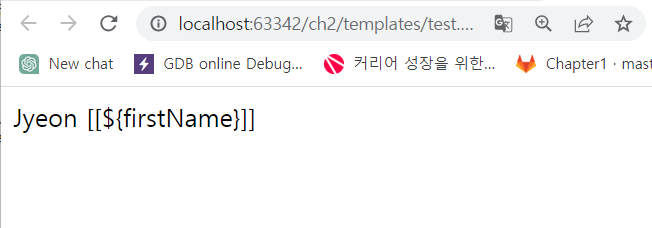
[[{$firstName}]]는 JSP처럼 적힌 내용이 나왔는데, 이것보다는 첫번째께 보기가 더 좋다.
템플릿이 타임리프에 의해 처리되고 나면, 처리된 값이 ${lastName} 대신 들어가니
<span th:text="${lastName}">Jyeon</span>
처럼 사용하는게 보통이다.
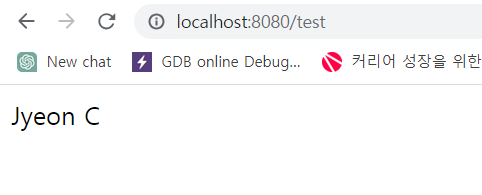
- 다음은 utext 속성을 확인해보자.
<!DOCTYPE html>
<html lang="en" xmlns:th="http://www.thymeleaf.org">
<head>
    <meta charset="UTF-8">
    <title>Title</title>
</head>
<body>
    <span th:text="${lastName}">Jyeon</span>
    <span>[[${firstName}]]</span>
    <span th:text="${'<i>JYeon, C</i>'}">JYeon, C</span>
    <span th:utext="${'<i>JYeon, C</i>'}">JYeon, C</span>
</form>
</body>
</html>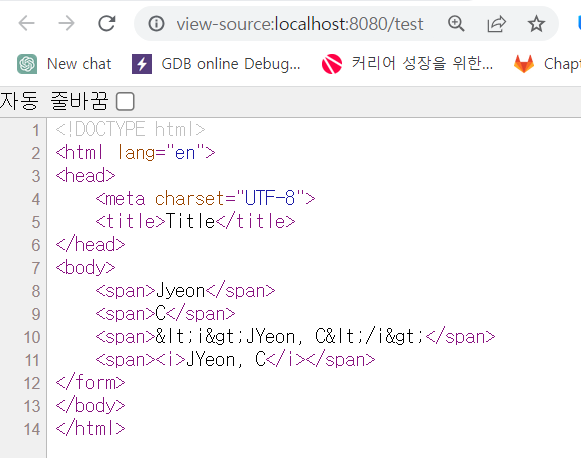
utext속성은 태그에 사용되는 < > 부등호를 <, >로 변환하지 않고 그대로 보여주는 것이다.
text속성이 주로 사용되겠지만, utext속성도 필요에 따라 사용된다.
- 템플릿 예제
<!DOCTYPE html>
<html lang="en" xmlns:th="http://www.thymeleaf.org">
<head>
    <meta charset="UTF-8">
    <title>Title</title>
</head>
<body>
    <span th:text="${lastName}">Jyeon</span>
    <span>[[${firstName}]]</span>

    <span th:text="'My name is ' + ${lastName} + ',' + ${firstName}"></span>
    <span th:text="|My name is ${lastName}, ${firstName}|"></span>

    <span th:text="${'<i>JYeon, C</i>'}">JYeon, C</span>
    <span th:utext="${'<i>JYeon, C</i>'}">JYeon, C</span>
</form>
</body>
</html>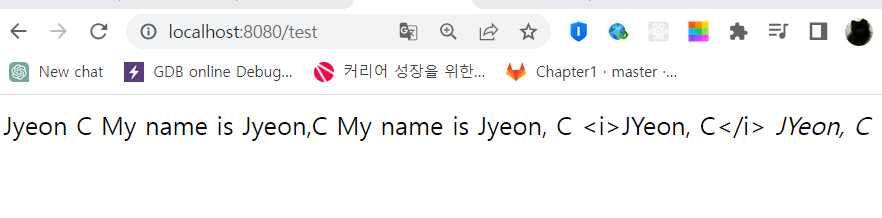
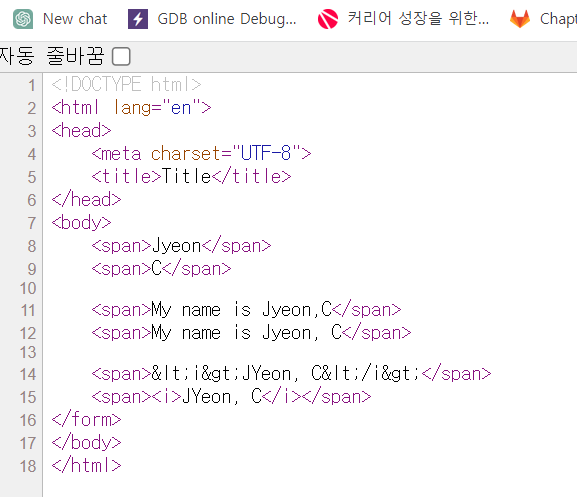
<span th:text="|My name is ${lastName}, ${firstName}|"></span>이렇게 사용하는게 편하니 잘 알아두자.
4. th:if, th:unless, th:switch로 조건부 처리
- 특정 조건에 맞는 경우만 처리
* th:if
<tr th:if="${list.size}==0">
	<td>게시물이 없습니다.</td>
</tr>
- 조건이 참일때만 보여준다.(아닐 경우 보여주지 않는다.)
* th:unless
<tr th:unless="${list.size}!==0">
	<td>게시물이 없습니다.</td>
</tr>
- if not으로 ~가 아닐 때(위와 같다.)
* 삼항연산자
<tr th:class="${status.even} ? 'even':'odd'">
	...
</tr>
참이면 even, 거짓이면 odd
* th:switch
<div th:switch="${user.grade}">
	<span th:case="A">특급</span>
	<span th:case="B">고급</span>
	<span th:case="C">중급</span>
	<span th:case="*">기타</span>
</div>
여긴 <div>태그로 되어있는데 이걸 <block>태그로도 할 수 있다.
<th:block th:switch="${user.grade}">
	<span th:case="A">특급</span>
	<span th:case="B">고급</span>
	<span th:case="C">중급</span>
	<span th:case="*">기타</span>
</th:block>
<실습>
- HomeController에 리스트를 하나 추가
list를 모델에 저장한 다음 이걸 템플릿을 통해 보여주자.
    @GetMapping("/test")
    public String test(Model model) {
        model.addAttribute("lastName", "Jyeon");
        model.addAttribute("firstName", "C");
        model.addAttribute("list", Arrays.asList("aaa","bbb","ccc","ddd","eee"));

        return "test"; // templates/test.html
    }
- text.html에 테이블 추가
<!DOCTYPE html>
<html lang="en" xmlns:th="http://www.thymeleaf.org">
<head>
    <meta charset="UTF-8">
    <title>Title</title>
</head>
<body>
    <table border="1px">
        <tr th:each="item : ${list}">
            <td th:text="${item}"></td>
        </tr>
        <tr th:if="${list.size}==0">
            <td>게시물이 없습니다.</td>
        </tr>
    </table>


    <span th:text="${lastName}">Jyeon</span>
    <span>[[${firstName}]]</span>

    <span th:text="'My name is ' + ${lastName} + ',' + ${firstName}"></span>
    <span th:text="|My name is ${lastName}, ${firstName}|"></span>

    <span th:text="${'<i>JYeon, C</i>'}">JYeon, C</span>
    <span th:utext="${'<i>JYeon, C</i>'}">JYeon, C</span>
</form>
</body>
</html>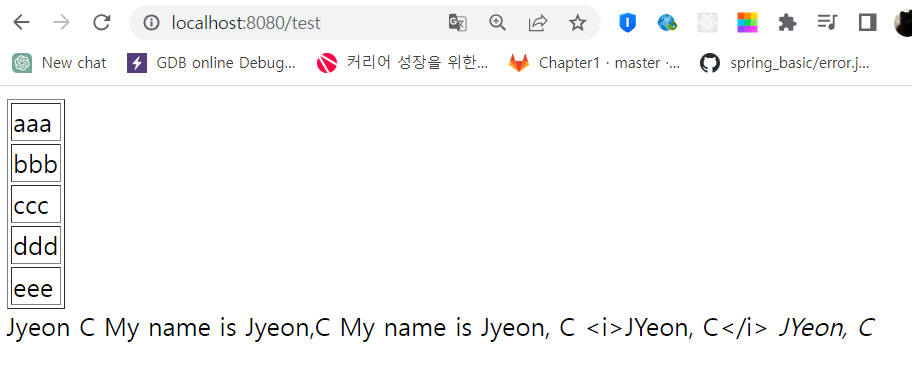
해당 코드에서 if를 unless로 바꾸면 "게시물이 없습니다"가 나오게 된다.
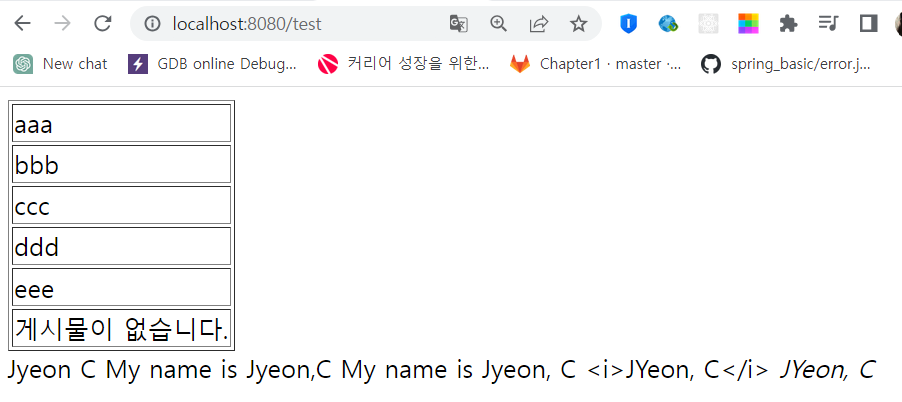
5. th:each와 th:block을 이용한 반복(1)
- Iterable의 반복 처리는 th:each 또는 th:block 사용. 향상된 for문과 유사
<select multiple>
	<option th:each="opt : ${list}" th:value="${opt}">[[${opt}]]</option>
</select>
list의 요소가 하나씩 opt로 들어간다.
- th:each를 쓰기 어려운 경우, th:block으로 처리
<th:block th:each="opt : ${list}">
	<input type="checkbox" th:value="${opt}">[[${opt}]]<br/>
</th:block>
input태그 같은 경우에는 <input type="checkbox" th:value="${opt}">까지가 input태그다.
그래서 each 속성을 사용하면, [[${opt}]] 부분은 반복이 안되고 <input type="checkbox" th:value="${opt}"> 부분만
반복된다. 그래서 input태그 같은 경우에는 block속성을 이용해서 써야한다.
block태그 같은 경우에는 이 자체가 속성이 아니라 태그이기 때문이다.
필요하면 쓰는데 가능하면 each속성 사용.
5. th:each와 th:block을 이용한 반복(2) - status변수
- 반복 관련 정보(index, count, size, odd, even, first, last, current) 제공
<select multiple>
	<option th:each="opt, status : ${list}" th:value="${opt}">
    	[[${status.index}]].[[${opt}]]
    </option>
</select>
list에 있는 요소 하나하나가 opt에 들어가는데, 그 사아이에 , status : 변수를 줄 수 있다.
이 변수는 객체라서 index와 같은 속성들을 가질 수 있다.
# index는 0~
# count는 1~
반복 횟수를 알려준다.
# size는 list의 사이
# odd는 홀수
# even은 짝수
# first는 첫 번째
# last는 마지막
# current는 현재
- status 변수의 선언을 생략하면, '변수명+Stat'을 사용
<select multiple>
<option th:each="opt : ${list}" th:value="${opt}" th:selected="${optStat.first}">
	[[${optStat.index}]].[[${opt}]]
  </option>
</select>
생략하면, opt에 Stat를 붙인 이름이 status 변수가 된다.
<실습>
text.html에 다음과 같은 <select>문을 넣어준다. multiple은 select를 펼쳐서 보여줌.
<!DOCTYPE html>
<html lang="en" xmlns:th="http://www.thymeleaf.org">
<head>
    <meta charset="UTF-8">
    <title>Title</title>
    <style>
        select {
            width: 80px;
            height: 100px;
        }
    </style>
</head>
<body>
<select name="" id="" multiple>
    <option th:each="opt : ${list}" th:value="${opt}">[[${opt}]]</option>
</select>

    <table border="1px">
        <tr th:each="item : ${list}">
            <td th:text="${item}"></td>
        </tr>
        <tr th:unless="${list.size}==0">
            <td>게시물이 없습니다.</td>
        </tr>
    </table>


    <span th:text="${lastName}">Jyeon</span>
    <span>[[${firstName}]]</span>

    <span th:text="'My name is ' + ${lastName} + ',' + ${firstName}"></span>
    <span th:text="|My name is ${lastName}, ${firstName}|"></span>

    <span th:text="${'<i>JYeon, C</i>'}">JYeon, C</span>
    <span th:utext="${'<i>JYeon, C</i>'}">JYeon, C</span>
</form>
</body>
</html>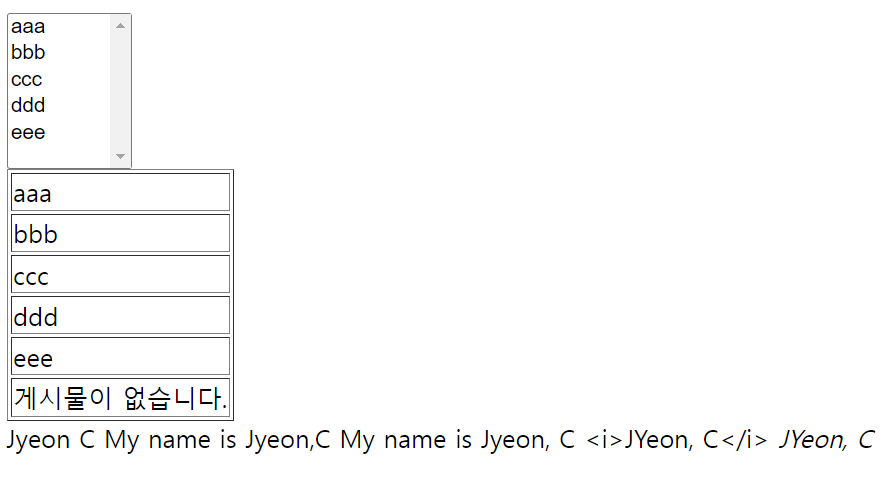
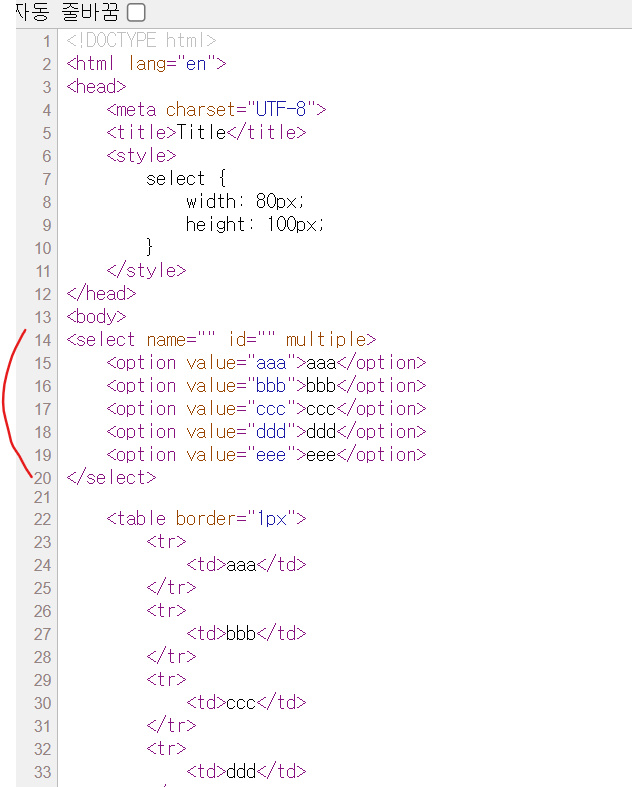
해당 페이지의 소스를 보면 다음과 같이 바뀐 것을 확인할 수 있다.
IF) 만약 input 태그에 each를 적용한다면?
다음 문장을 test.html의 <body>안에 넣은 후 브라우저에서 확인해보자.
<input th:each="chk : ${list}" type="checkbox" th:value="${opt}">[[${opt}]]<br>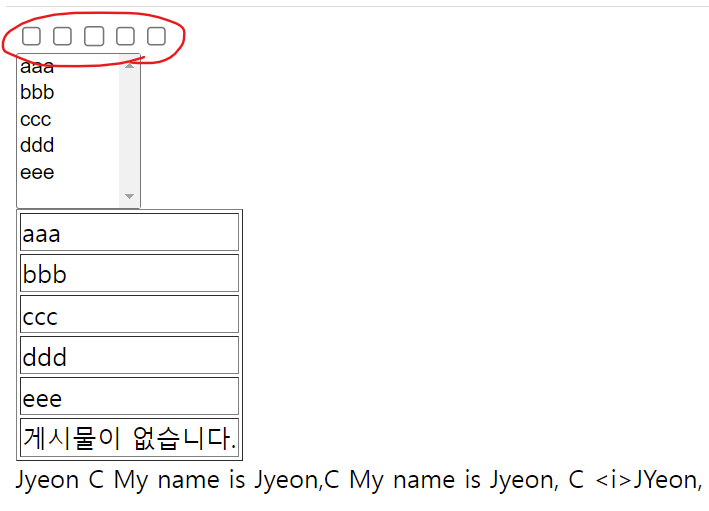

체크 박스만 다섯개가 나온 것을 확인할 수 있다.
이런 경우 input에 each대신 block을 사용해주면 좋다.
<th:block th:each="opt : ${list}">
    <input type="checkbox" th:value="${opt}">[[${opt}]]<br>
</th:block>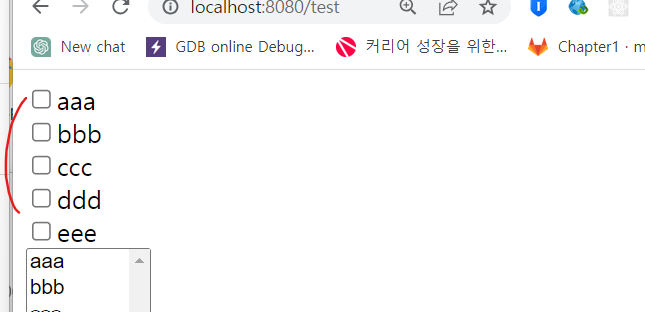
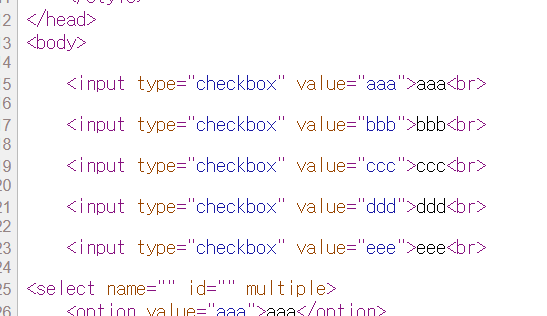
아까와 달리 값이 잘 나온 것을 확인할 수 있다.
6. th:attr와 th:attrappend, th:attrprepend로 속성 값 설정하기
- th:attr은 속성의 값을 설정하는데 사용
<img src="images/dummy.png" th:attr="src=@{images/cat.png}"/>

<img src="images/cat.png" />
이미지 태그에 src속성을 기본값으로 해놓고, src 속성을 템플릿 엔진에 의해서 처리된 결과로 바뀌치기 해주면
<img src="images/cat.png" /> 이렇게 바뀐다.
- 대부분의 속성(attribute)은 th:속성이름도 가능
<img src="images/dummy.png" th:src="@{images/cat.png}"/>
- th:attrappend(뒤에 추가), th:attrprepend(앞에 추가)로 기존의 속성 값에 새로운 값을 추가 가능
<input type="button" value="Go" class="btn" th:attrappend="class=${' '+style}" />기존의 클래스 속성이 있는데 btn 뒤에 추가되는 것
<input type="button" value="Go" class="btn new-style" />
7. URL링크 -@{...}
- @{...}를 경로로 변환. '/'로 시작할 때는 context root를 추가.
<a href="boardList.html" th:href="@{/board/list}">기본 context root는 '/' 이건데 만약 /ch2로 바꾸면 @가 앞에 context root를 추가해준다.
<a href="/ch2/board/list">
- Query parameter와 Path variable(여러 개일 때는 구분자 ',' 사용)
<a href="board.html" th:href="@{/board/read(bno=${bno},type='L')}"><a href="/ch2/board/read?bno=123&type=L">진짜 편리한 것!
bno=${bno} -> ?bno=123 / , -> & / type = 'L' -> type=L
<a href="board.html" th:href="@{/board/{bno}/read(bno=${bno})}"><a href="/ch2/123/read">Path variable은 경로 중간에 변수{bno}가 들어가는 것. bno=${bno} 에서 값이 123이면 해당 값이 들어가는 것
<실습>
/로 시작하면 앞에 context root를 붙여준다. 그걸 한 번 확인해보자.
application.properties를 변경해서 context를 ch2로 바꿔보자.
https://docs.spring.io/spring-boot/docs/current/reference/html/application-properties.html
Common Application Properties
docs.spring.io
ctrl + F하고 context path 결과로 나오는 해당 문장을 복사한다음 application.properties에 붙여넣는다.
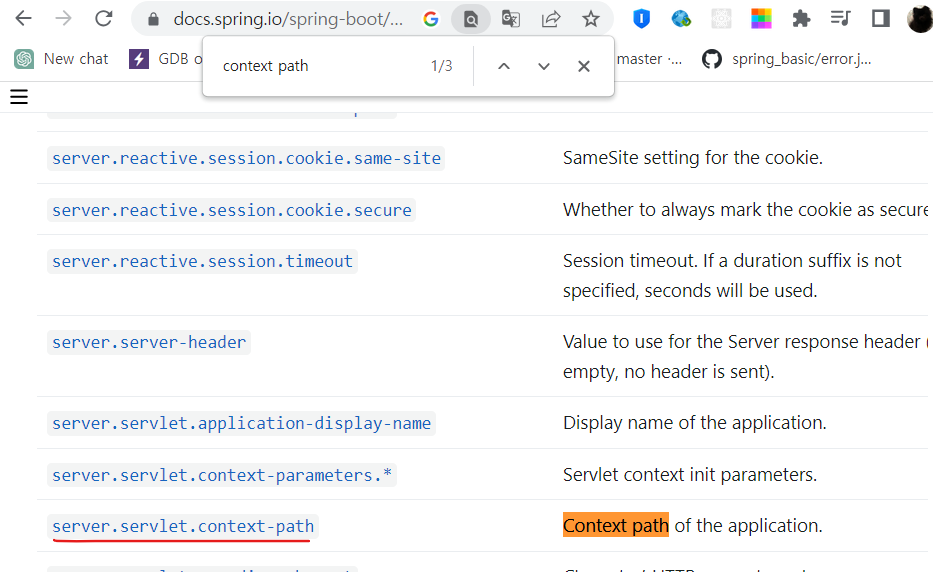
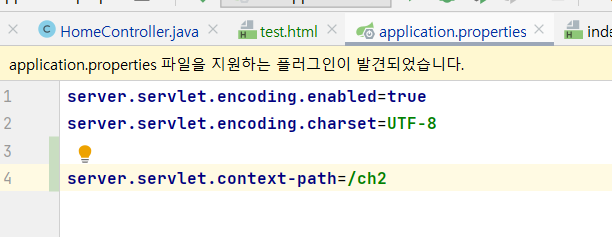
ch2로 지정해준다음 재시작.
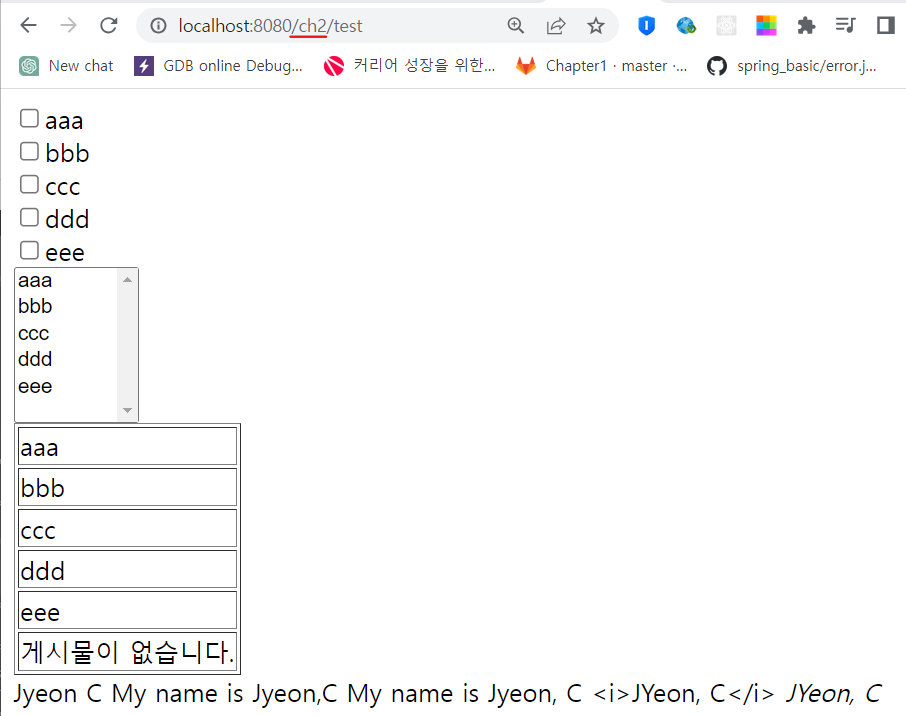
<body>
<a href="board.html" th:href="@{/board/list}"></a>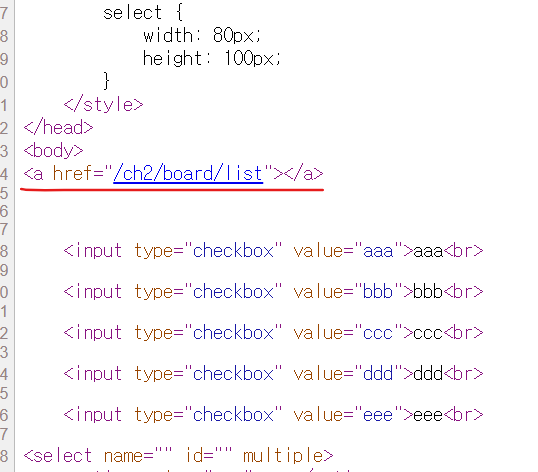
링크가 만들어졌다.
href=board.html는 템플릿에 넣어놓은거고, th:href="@{/board/list}"가 계산돼서 이걸 엎어쳤는데, 앞에
context root인 ch2가 들어가서 /로 시작하는 경우에는 context root가 들어간다는 것을 확인할 수 있다.
-이번엔 query parameter를 추가해보자.
<a href="board.html" th:href="@{/board/list(bno=${bno}, type='L')}">aaa</a>(bno=${bno}, type='L') 두 개의 query parameter가 쿼리 스트링으로 만들어서 들어갈 것이다.
그리고 HomeController에 bno를 추가해준다.
    @GetMapping("/test")
    public String test(Model model) {
        model.addAttribute("lastName", "Jyeon");
        model.addAttribute("firstName", "C");
        model.addAttribute("list", Arrays.asList("aaa","bbb","ccc","ddd","eee"));
        model.addAttribute("bno", "123");

        return "test"; // templates/test.html
    }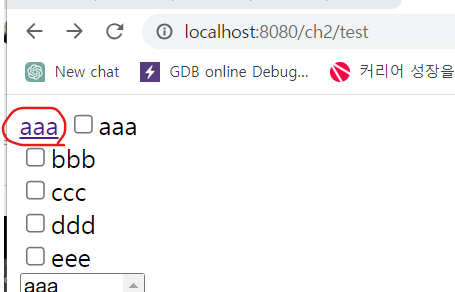
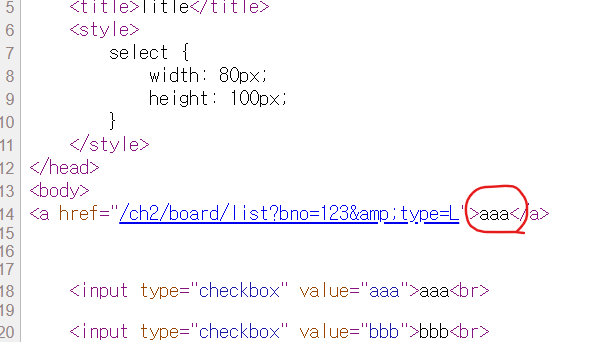

쿼리 스트링이 잘 만들어진 것을 확인할 수 있다.
값은 잘 나온다!
8. 주석(comment)
<!-- --> : HTML 주석. 주석 내의 부분은 타임리프가 처리 안함
<!--/* */--> : parser-level 주석. parser가 처리할 때 무시. 에러가 있어도 OK
<!--/*/ /*/--> : prototype-only 주석. html에서는 주석이지만, 처리되면 주석 아님
<!-- <span th:text="${list}"></span> -->

<!--/*  <span th:text="${list}"></span>  */-->

<!--/*/  <span th:text="${list}"></span>  /*/-->
<!--/*/ <th:block th:each="opt : ${list}"> /*/--> // 타임리프가 처리
<input type="checkbox" th:value="${opt}">[[${opt}]]<br/>
<!--/*-->
<input type="checkbox" th:value="sample1">sample<br/>
<input type="checkbox" th:value="sample2">sample<br/>
<!--/*-->
<!--/*/ </th:block> /*/--><!--/*/ <th:block th:each="opt : ${list}"> /*/-->
타임리프가 처리되게 하려면 이렇게 해야한다. 처리는 하는데 HTML로 봤을 때 주석처럼 보이게 하기 위해 이렇게 한다.
보다 타임리프 템플릿을 HTML스럽게 하려고 들어가는 것이다.
<실습>
cf)
(tr>td{$})*3여기에 tab을 누르면
<tr>
    <td>1</td>
</tr>
<tr>
    <td>2</td>
</tr>
<tr>
    <td>3</td>
</tr>
이렇게 된다!
<!--/*-->
<tr>
    <td>1</td>
</tr>
<tr>
    <td>2</td>
</tr>
<tr>
    <td>3</td>
</tr>
<!--*/-->
이렇게 하면 템플릿 엔진이 템플릿을 처리할 때 해당 부분을 없애버린다.
근데 이걸 그냥 볼 때는 얘가 나온다.
(절대 경로를 복사해서 브라우저에서 실행)
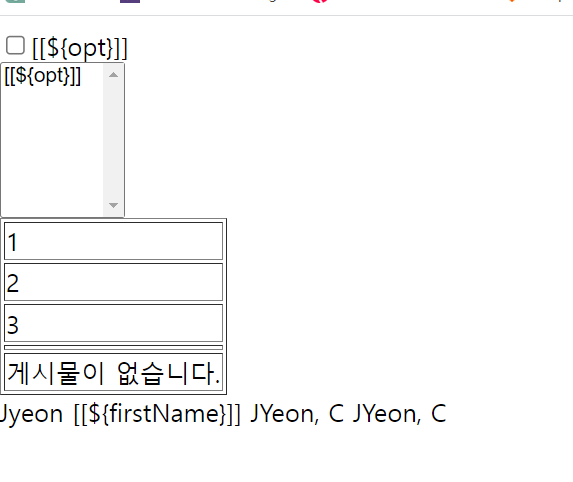
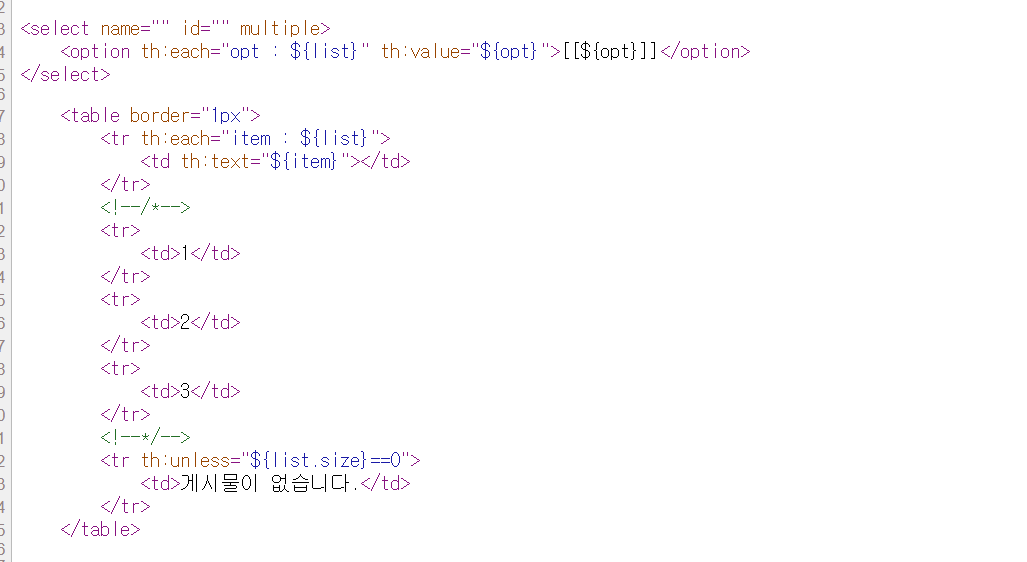
그냥 html로 봤을 때 샘플로 넣어줄 데이터를 보여줄 때 사용한다.
템플릿 엔진에 의해서 반복문이 처리되고도 1,2,3이 나오면 안된다.(샘플 데이터이기 때문에)
그럴 때 주석을 넣어주면, 이 html에서 해당 부분이 템플릿 엔진에서 처리되기 전에는 이렇게 보인다.
처리가 되면 주석 부분이 사라지고, 반복문에 의해서 생성된 부분만 보이게 된다.
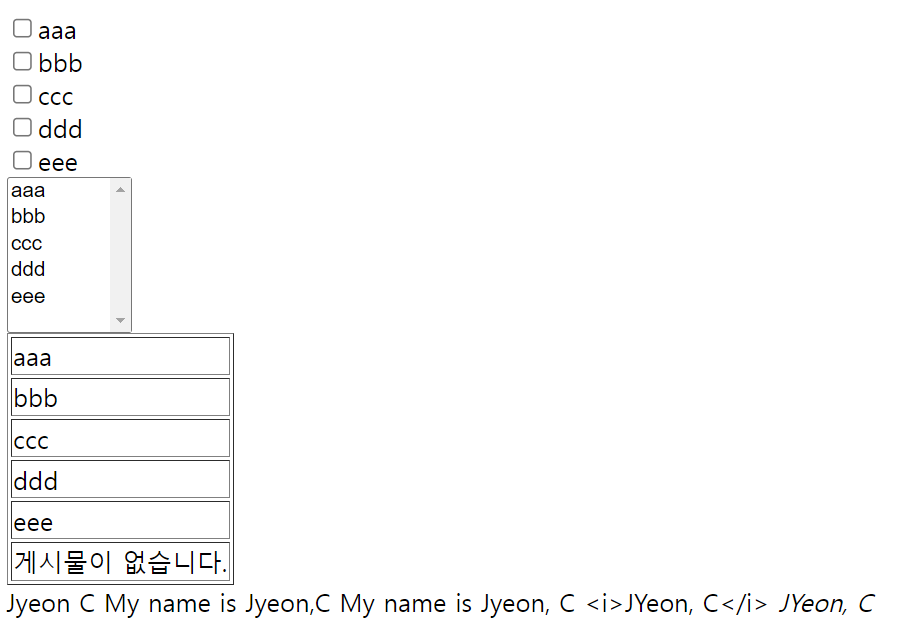
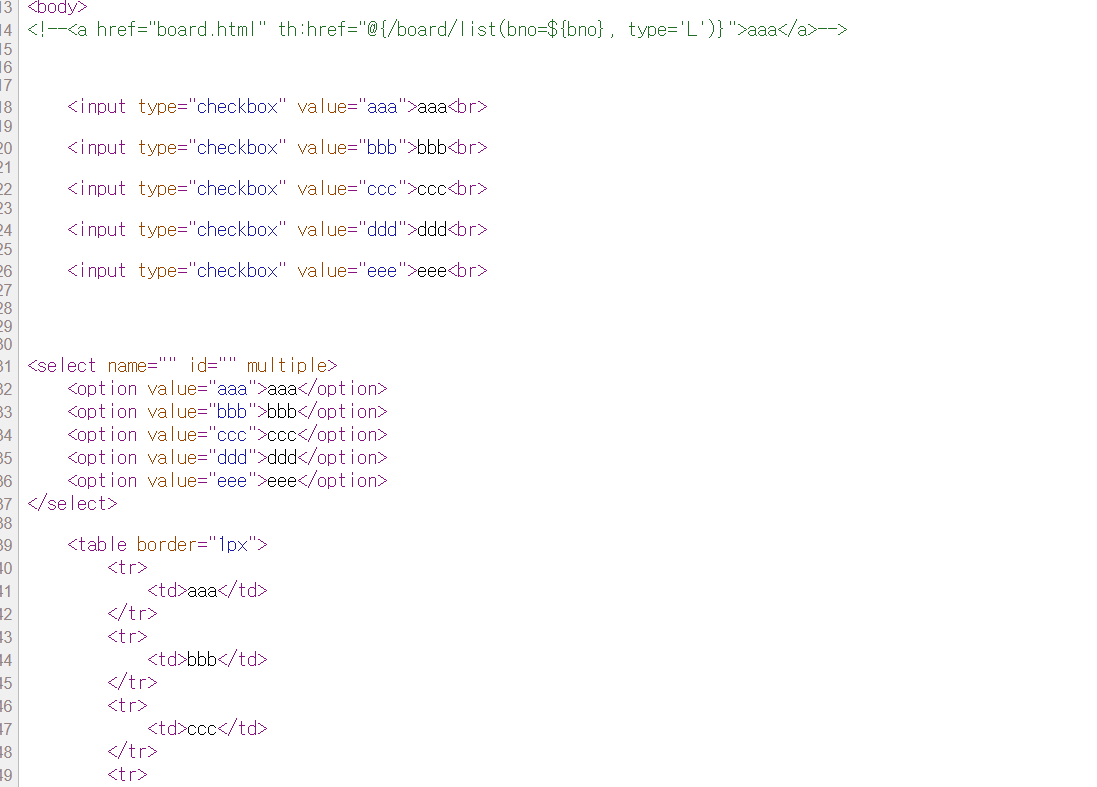
실제로 서버를 돌려서 확인해보면 해당 내용이 없어지고, 반복문의 결과가 채워진 것을 확인할 수 있다!
그리고, <!--<a href="board.html" th:href="@{/board/list(bno=${bno}, type='L')}">aaa</a>--> 부분은 전혀 처리되지 않은걸
확인할 수 있다.
9. 자바스크립트 인라이닝
- [[${...}]]를 자바스크립트에 맞게 적절히 변환해주는 편리한 기능
<script>
	var firsName = [[${firsName}]]
	var lastName = /*[[${lastName}]]*/ "testName"
	var arr = [[${list}]]
	var userObj = [[${user}]]
</script>
이런식으로 바뀌지 않고 나온다.
<script>
	var firsName = Seong
	var lastName = /*JYeon*/ "testName"
	var arr = [aaa, bbb, ccc, ddd, eee, fff]
	var userObj = com.example.boot_ch2.User@6adf734d
</script>
- 자바스크립트 inline을 이용
<script th:inline="javascript">
	var firsName = [[${firsName}]]
	var lastName = /*[[${lastName}]]*/ "testName"
	var arr = [[${list}]]
	var userObj = [[${user}]]
</script>
똑같은 내용인데, 자동으로 " "가 붙고, lastName이 처리돼서 대체된 값이 찍히고, list도 배열처럼 " "가 다 들어가게 되고,
자바 스크립트 객체도 다 자동 변환이 된다.
<script>
	var firsName = "Seong"
	var lastName = "JYeon"
	var arr = ["aaa", "bbb", "ccc", "ddd", "eee", "fff"]
	var userObj = {"name" : "aaa", "age" : 20}
</script>
<실습>
- HomeController에 model.addAttribute("user", new User("aaa",20)); 문장을 추가하고, 새로운 User 클래스를 생성한다.
- test.html에 위 실습 코드 추가(inline 적용 전)
package com.fastcampus.ch2;

public class User {
    private String name;
    private int age;

    public User(String name, int age) {
        this.name=name;
        this.age=age;
    }

    public String getName() {
        return name;
    }

    public void setName(String name) {
        this.name = name;
    }

    public int getAge() {
        return age;
    }

    public void setAge(int age) {
        this.age = age;
    }
}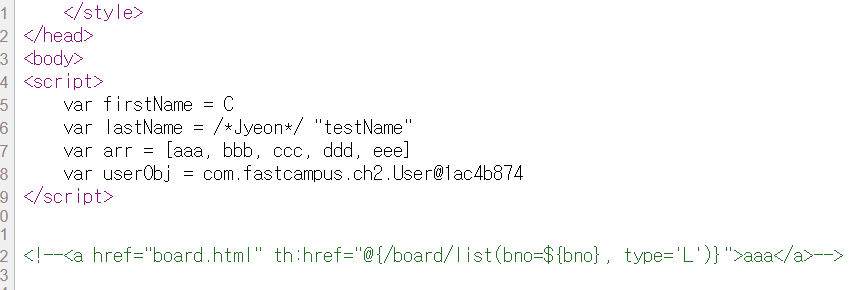
처리가 안돼서 나온 것을 확인할 수 있다.
- 이번엔 inline이 적용된 실습 코드를 수행해보자.
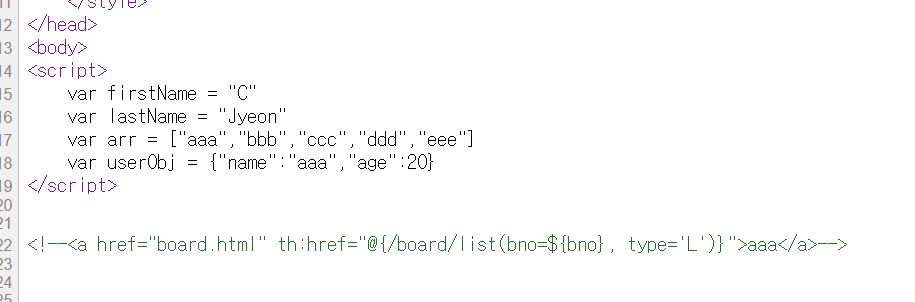
이전과 달리 처리가 잘 된 것을 볼 수 있다.
10. 유틸리티 객체
* 유용한 메소드를 제공하는 객체들. 변환 & 형식화를 쉽게
- 문자열 & 숫자 > #strings, #numbers
- 날짜 & 시간 : #dates, #calendars, #temporals
- 배열 & 컬렉션 : #arrays, #lists, #sets, #maps
- 기타 :
#uris - URI/URL의 escape/unescape 처리
#conversions - 스프링의 변환기능(ConversionService) 지원
#messages - 자바의 메시지 형식화 국제화 지원
#objects - null 확인 기능 제공
#bools - boolean연산(and, or) 기능 제공
https://www.thymeleaf.org/doc/tutorials/3.1/usingthymeleaf.html
Tutorial: Using Thymeleaf
1 Introducing Thymeleaf 1.1 What is Thymeleaf? Thymeleaf is a modern server-side Java template engine for both web and standalone environments, capable of processing HTML, XML, JavaScript, CSS and even plain text. The main goal of Thymeleaf is to provide a
www.thymeleaf.org
11. 기본 객체
- 서블릿의 기본 객체(request, session, application등)에 접근방법을 제공
@GetMapping("test")
public String test(Model model, HttpServletRequest request) {
	//...
    request.setAttribute("year", 2022);

    HttpSession session = request.getSession();
    session.setAttribute("id", "asdf");

    ServletContext application = session.getServletContext();
    application.setAttribute("email", "service@fastcampus.com");
Key, Value로 저장했을 때 이걸 타임리프에서 어떻게 읽어오냐에 관한 것.
- 접근하는 방법(이게 더 편리!)
<h1 th:text="|year  : ${year}|"></h1>
<h1 th:text="|id  : ${session.id}|"></h1>
<h1 th:text="|email  : ${application.email}|"></h1>
또 다른 읽는 방법도 제공한다.
<h1 th:text="|year  : ${#request.getAttribute('year')}|"></h1>
<h1 th:text="|id  : ${#session.getAttribute('id')}|"></h1>
<h1 th:text="|email  : ${#servletContext.getAttribute('email')}|"></h1>
- Servlet에는 Servlet Context가 하나의 Web Application이 공유하는 공간인데, 여기에 application객체가 있다.
이건 전역 저장소라 한 웹 어플리케이션 전체에서 다 접근할 수 있는 저장소이다.
session은 클라이언트마다 하나씩 갖게 되는 개별저장소이다.
request는 요청 정보가 담겨있는 객체이며, 이것도 저장소이다. 이는 하나의 요청이 처리되는 동안만 유지가 된다.
저장소에는 내부적으로 맵이 존재하는데, 여기에 저장할 때 쓰는게 setAttribute(), getAttribute()이다.
이 두 메소드가 저장소마다 있으며, 이를 이용해서 각각 저장소에 있는 맵에 저장하고 읽어오는 것이다.
| 기본 객체 | 유효 범위 | 설명 |
| pageContext | 1개 JSP페이지 | JSP페이지의 시작부터 끝까지. 해당 JSP 내부에서만 접근 가능. 페이지당 1개 |
| request | 1+개 JSP페이지 | 요청의 시작부터 응답까지. 다른 JSP로 전달 가능. 요청마다 1개 |
| session | n개 JSP페이지 | session의 시작부터 종료까지(로그인 ~ 로그아웃). 클라이언트마다 1개 |
| application | context 전체 | Web Application의 시작부터 종료까지. context 내부 어디서나 접근 가능 모든 클라이언트가 공유. context마다 1개 |
되도록이면 request에 저장(부담이 적으니까)
| 속성 관련 메서드 | 설명 |
| void setAttribute(String name, Object value) | 지정된 값(value)을 지정된 속성 이름(name)으로 저장 |
| Object getAttribute(String name) | 지정된 이름(name)으로 저장된 속성의 값을 반환 |
| void removeAttribute(String name) | 지정된 이름(name)의 속성을 삭제 |
| Enumeration getAttributeNames() | 기본 객체에 저장된 모든 속성의 이름을 반환 |
<실습>
- HomeController, test.html에 실습 코드 추가
    @GetMapping("/test")
    public String test(Model model, HttpServletRequest request) {
        request.setAttribute("year", 2022); // request 객체에 저장

        HttpSession session = request.getSession(); // 요청으로부터 session 객체를 얻어온다.
        session.setAttribute("id", "asdf"); // session객체에 id를 저장

        ServletContext application = session.getServletContext();
        application.setAttribute("email", "jyeon@aaa.com");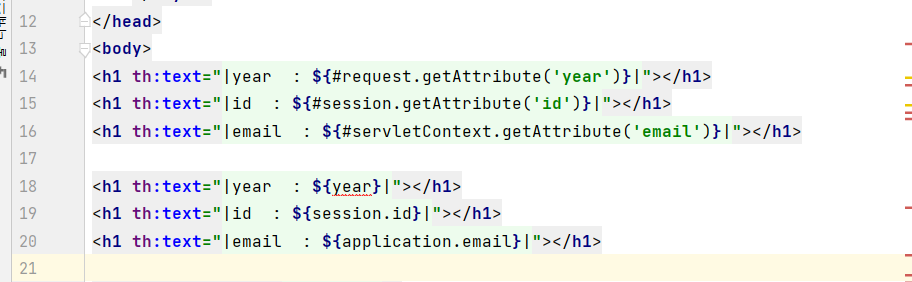
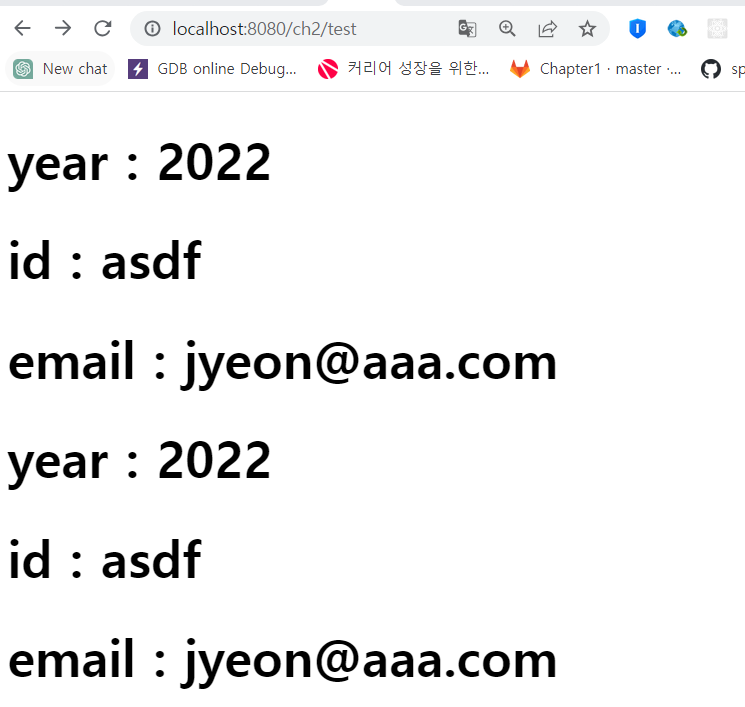

두 실습코드 다 결과를 잘 얻어온다.
'SpringBoot' 카테고리의 다른 글
| ch3 02. Java Reflection API (0) | 2023.07.19 |
|---|---|
| ch3 01. Spring DI의 원리(1) (0) | 2023.07.18 |
| ch2 15. forward와 redirect - 실습 (0) | 2023.07.14 |
| ch2 14. forward와 redirect - 이론 (0) | 2023.07.14 |
| ch2 13. filter와 interceptor (0) | 2023.07.07 |


