CodePen
An online code editor, learning environment, and community for front-end web development using HTML, CSS and JavaScript code snippets, projects, and web applications.
codepen.io
- 작성한 코드의 결과를 바로 확인할 수 있다.
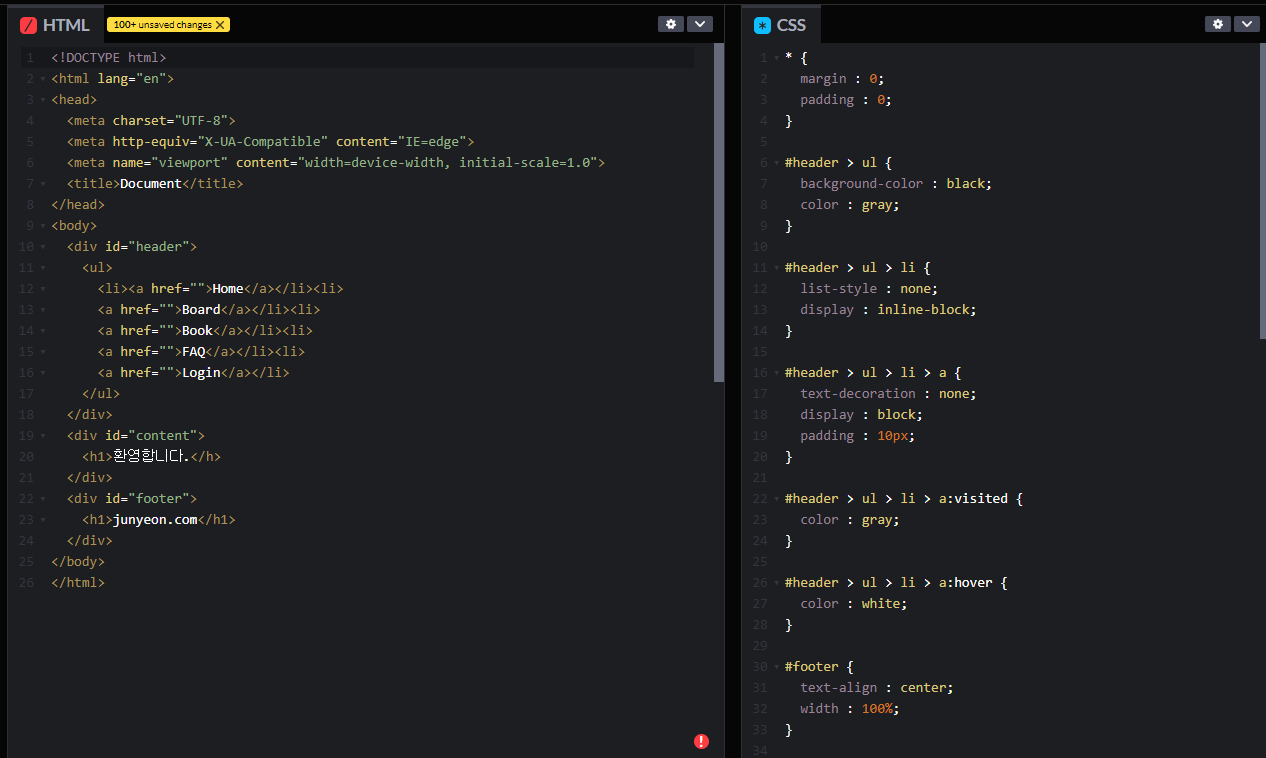

간단하게 코드를 작성한 후 thymeleaf 템플릿 파일들에 적용해보자.
템플릿의 레이아웃에 적용하기 위해서는 먼저 라이브러리를 다운받아야 한다.
pom.xml 파일에서 dependency를 우클릭 한 후 생성을 누른다.
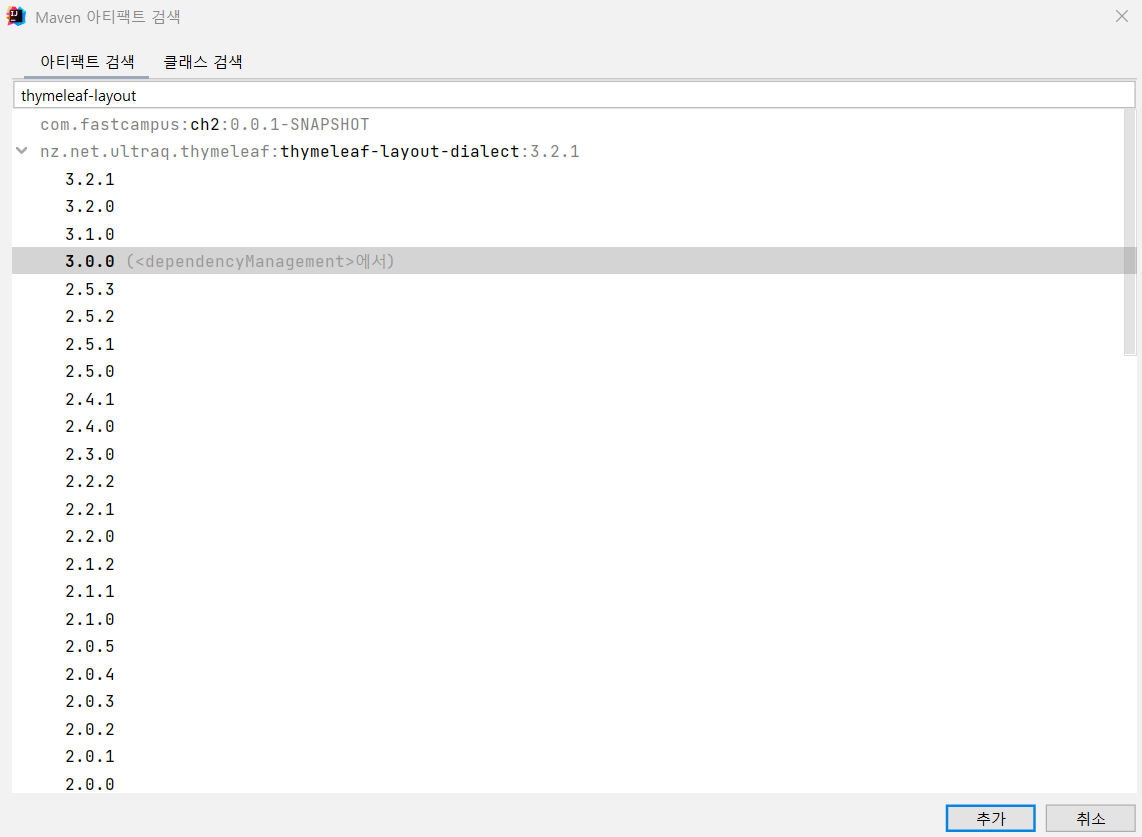
다음과 같이 추가한 후 pom.xml을 업데이트 해준다.
- templates 폴더 내에 fragments, layouts 폴더를 생성해준다.
- fragments 폴더 내에 header.html, footer.html파일을 생성해준다.
<header.html>
<!DOCTYPE html>
<html lang="en" xmlns:th="http://www.thymeleaf.org">
<div th:fragment="header">
    <div id="header">
        <ul>
            <li><a href="">Home</a></li><li>
            <a href="">Board</a></li><li>
            <a href="">Book</a></li><li>
            <a href="">FAQ</a></li><li>
            <a href="">Login</a></li>
        </ul>
    </div>
</div>
</html>
<footer.html>
<!DOCTYPE html>
<html lang="en" xmlns:th="http://www.thymeleaf.org">
<div th:fragment="footer">
    <div id="footer">
        <h1>jungyeon.com</h1>
    </div>
</div>
</html>
- static폴더 내에 css 폴더를 생성해준다음 main.css 파일을 생성한다.
* {
    margin : 0;
    padding : 0;
}

#header > ul {
    background-color : black;
    color : gray;
}

#header > ul > li {
    list-style : none;
    display : inline-block;
}

#header > ul > li > a {
    text-decoration : none;
    display : block;
    padding : 10px;
}

#header > ul > li > a:visited {
    color : gray;
}

#header > ul > li > a:hover {
    color : white;
}

#footer {
    text-align : center;
    width : 100%;
}
- layouts폴더 mainLayout.html을 생성한다.
<!DOCTYPE html>
<html lang="en" xmlns:th="http://www.thymeleaf.org" xmlns:layout="http://www.ultraq.net.nz/thymeleaf/layout">
<head>
    <meta charset="UTF-8">
    <title>Title</title>
    <link rel="stylesheet" href="../css/main.css">
</head>
<body>
    <div th:replace="fragments/header::header"></div>
    <div layout:fragment="content"></div>
    <div th:replace="fragments/footer::footer"></div>
</body>
</html>
- index.html파일에 적용하기 위해 코드를 추가한다.
<!DOCTYPE html>
<html lang="en" xmlns:th="http://www.thymeleaf.org" xmlns:layout="http://www.ultraq.net.nz/thymeleaf/layout"
layout:decorate="~{layouts/mainLayout}">
<head>
    <meta charset="UTF-8">
    <title>Title</title>
</head>
<div layout:fragment="content">
    <h1>환영합니다.</h1>
</div>
</html>
적용된 결과 화면은 다음과 같다.
'SpringBoot' 카테고리의 다른 글
| ch2 14. forward와 redirect - 이론 (0) | 2023.07.14 |
|---|---|
| ch2 13. filter와 interceptor (0) | 2023.07.07 |
| ch2 11. @RequestMapping과 URL인코딩 (0) | 2023.07.07 |
| ch2 10. 로그인화면 만들기 (0) | 2023.07.07 |
| ch2 08. @RequestParam과 @ModelAttribute - 이론 (0) | 2023.07.07 |


